CCPM+, our project management software add-in to Microsoft Project now includes the Project Chain View. The Project Chain View enables project teams to know exactly where to focus work to keep the project on schedule, and to plan ahead for schedule improvement if and when needed. This tool turns project management around, from looking through the rear view mirror with variance explanations to driving the project forward by looking through the windshield to focus on what matters most.
The Project Chain View uses the Critical Chain Project Management (CCPM) method to determine which tasks in the project require special attention. First, the CCPM status inputs actual start and finish dates for tasks, and weekly updates for the tasks working on a particular day of the week, to calculate a buffer impact for all incomplete tasks in a project. Tasks that have not been started inherit buffer impact from their predecessors. Next, the Project Chain View sorts tasks by their buffer impact, with a secondary sort by likely start date for each task. This approach lines up chains of tasks that are most likely to affect the project finish date.
Your management team first focuses on the chain of tasks causing the most buffer impact. They focus first on the earliest incomplete task on that chain to ensure it is not stuck. Then, depending on the amount of buffer penetration compared to the progress on the project, they look down the chain of tasks to find and plan for opportunities to recover buffer. That is, to shorten the remaining actual performance time for that series of tasks.
Then they look to see if the next chain tasks has nearly the same buffer impact. If so, they may need to plan buffer recovery on that chain as well. They continue looking down the chains until they reach a point at which the project will comfortably meet its deadline, and then go to work implementing the planned buffer recovery actions.
The figure illustrates the Project Chain View. The Buffer Impact column shows the effect that task has on the project buffer. The indicator illustrates the importance of the task relative to buffer status. Red means that buffer recovery actions are needed. Yellow means that buffer recovery may be needed in the near future.
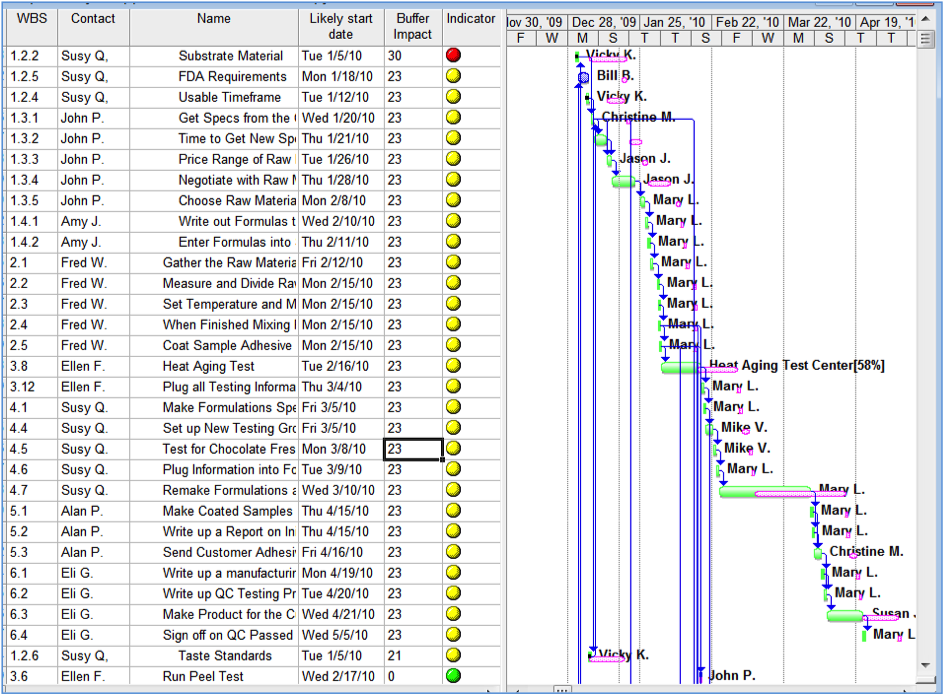
The first task is causing 30% of project buffer use. Management must assure it completes as soon as possible. The next chain of tasks, at 23% buffer impact, offers many opportunities to recover buffer. Buffer recovery actions might including starting some tasks early, adding resources to a task, changing the resource on a task to more experienced person, and so forth.